logs
Log
By setting up 'Log' notifications, Kexa will output alerts to the console/logs, making them available for viewing in your terminal.
Prerequire
No external dependencies or services are required. Log notifications are built into Kexa.
Configuration
Log notifications are configured in your rules file alongside other notification types:
- version: 1.0.0
  date: 07-23-2024
  alert:
    fatal:
      enabled: true
      type:
        - log
        - email  # Can combine with other notification types
      to:
        - 'email@gmail.com'
    error:
      enabled: true
      type:
        - log
      to:
    warning:
      enabled: true
      type:
        - log
      to:
    info:
      enabled: true
      type:
        - log
      to:
    global:
      enabled: true
      type:
        - log
      to:
      conditions:
        - level: 0
          min: 1
        - level: 1
          min: 1
        - level: 2
          min: 1
        - level: 3
          min: 1
  rules:
    # all rules are here
Expected Results
When log notifications are enabled, you will see detailed alert messages in your console output:
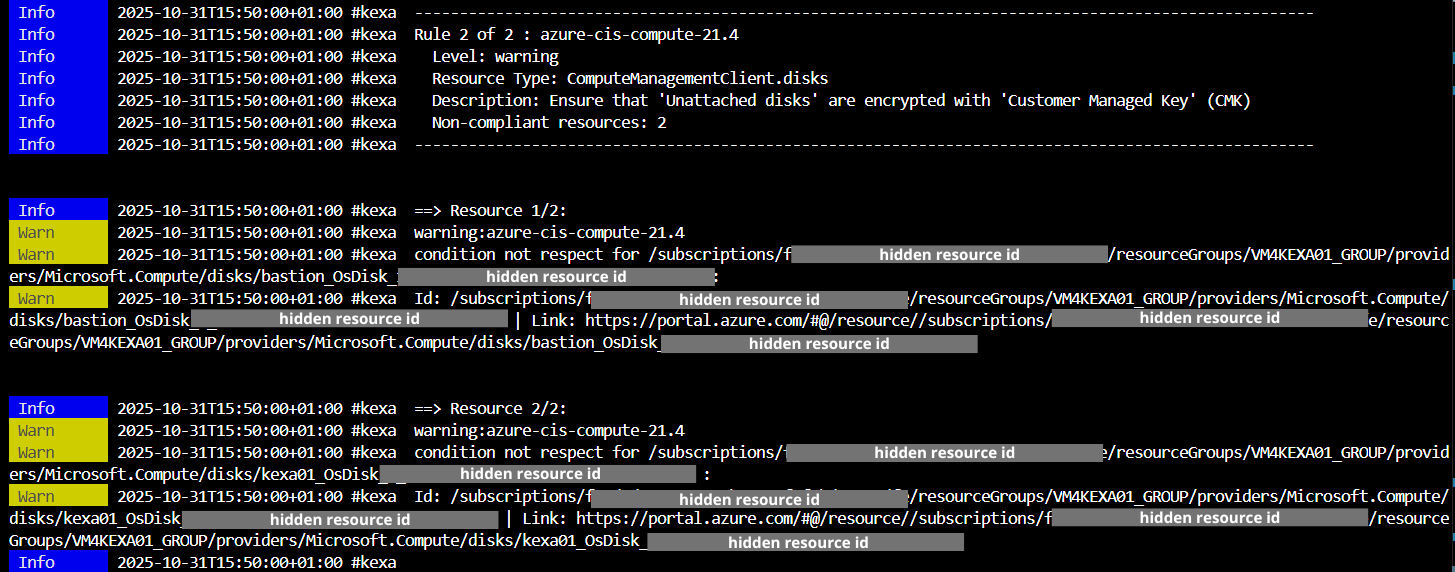
The log output includes:
- Color-coded severity levels
- Resource details and identifiers
- Rule violations with descriptions
- Summary statistics
Best Practices
- Combine with other notifications: Use logs alongside email/SMS for comprehensive alerting
- Use for development/testing: Logs are particularly useful when setting up and testing Kexa rules
- Consider log management: For production deployments, ensure your log rotation and management systems can handle the additional log volume
Troubleshooting
Logs not appearing:
- Check that log notifications are enabled in your rules file
- Check log level configuration
- Verify Kexa is running and processing rules successfully