
MySQL
Configuration
Requirements
You must create the MySQL database yourself. All tables and constraints will be created automatically if required.
Required Fields
- type:
"mysql" - urlName: MySQL connection URI (with database included)
Connection String Format
mysql://username:password@host:port/database_name
Example Configuration
{
  "save": [
    {
      "type": "mysql",
      "urlName": "MYSQL_CONNECTION",
      "name": "Production MySQL",
      "description": "Main MySQL database for scan results",
      "origin": "kexa-production",
      "tags": {
        "environment": "production"
      },
      "onlyErrors": false,
      "logs": true
    }
  ]
}
Example for a MySQL configuration.
Environment Variables
Set your MySQL connection string:
export MYSQL_CONNECTION="mysql://kexa_user:password@localhost:3306/kexa_database"
Database Schema
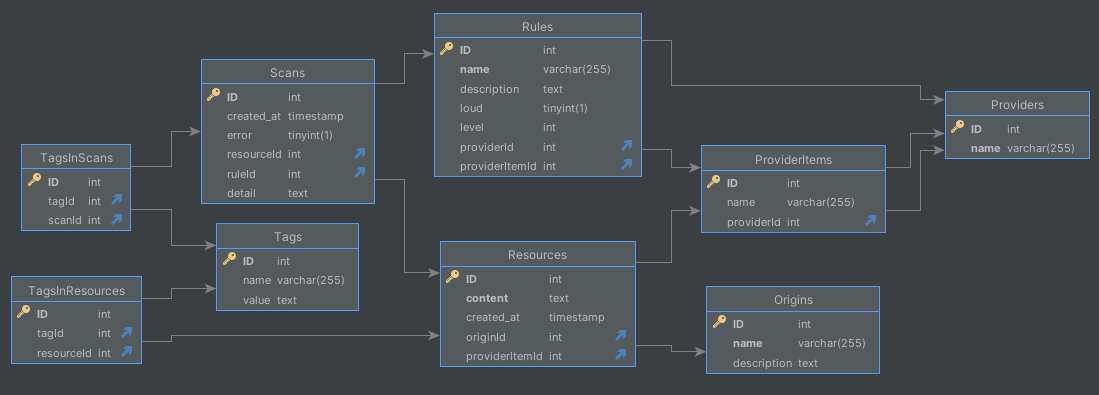
Kexa automatically creates tables following this schema:
Main Tables
- ScanResults: Scan execution results and summaries
- RuleResults: Individual rule evaluation results
- ResourceResults: Specific resource findings
- Logs: Execution logs (if logs=true)
Features
- Automatic Schema Creation: Tables and constraints created automatically
- Relational Structure: Normalized data with foreign key relationships
- SSL Support: Secure connections supported
- Performance: Efficient for structured queries and reporting
Troubleshooting
- Connection Refused: Check MySQL server status and firewall
- Access Denied: Verify username, password, and user permissions
- Database Not Found: Ensure database exists (Kexa only creates tables)
- SSL Issues: Verify SSL configuration if using secure connections